

Inputs
Reference in Rhino
Surface
The surface the pattern is built on. It must be a planar (flat) surface.
Point
The attractor. Panels close to it get narrower and open a gap in the surface. Place it on or near the surface.
Main Sliders
Also try: move the MD Slider from 0,0 to 0.5,0.5. Each panel then shrinks toward its own centre instead of toward one side, so the gaps open evenly on both sides of every bar.
Notes
- The panels only get narrower, never shorter. They shrink along the surface’s U direction, so the bars always run along V.
- Swap the two scale values to reverse the effect: panels stay wide near the point and thin out toward the edges.
- Reshape the
Graph Mapperto change how wide the gap is and how softly it fades into the solid panel. - Keep Scale far from the point below 1 if you want the bars to stay separate. At 1, the panels far from the point keep their full width and neighbouring bars touch. Raise Scale near the point above 0 if the panels near the point shouldn’t disappear completely.
Design Logic
How the script builds the pattern, step by step.
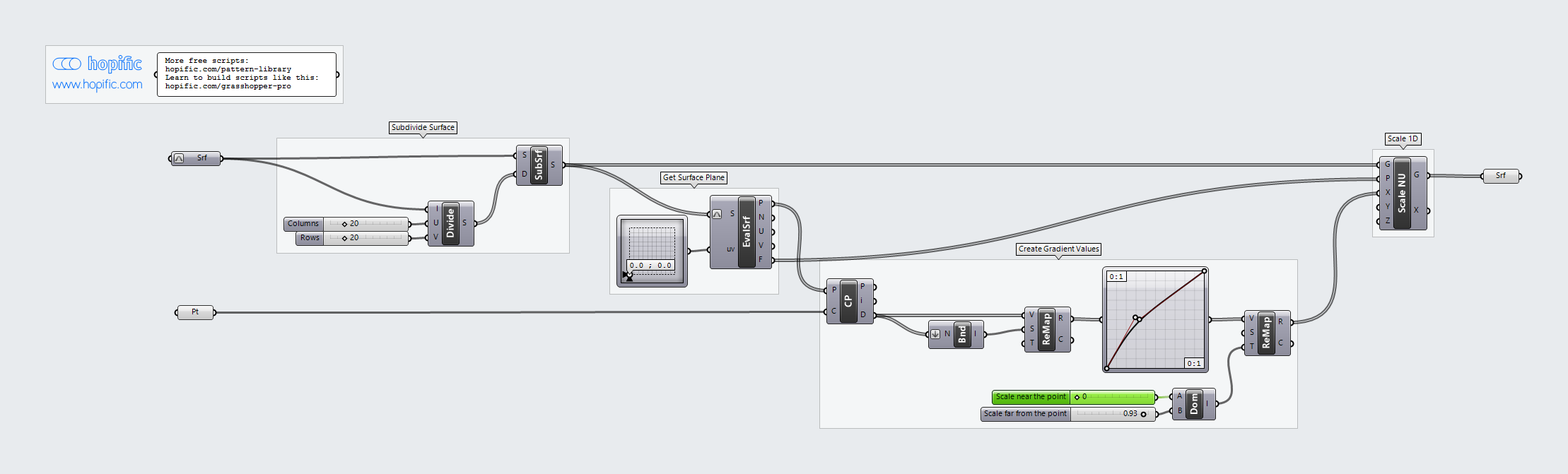
| Step | How the script does it |
|---|---|
| 1. Split the surface into panels | Divide Domain² and Isotrim cut the surface into a grid of small panels, Columns across and Rows up. |
| 2. Find a base point and direction on each panel | Evaluate Surface reads each panel at the position set by the MD Slider (its corner by default) and returns a point and a plane there. |
| 3. Measure each panel’s distance to your point | Closest Point measures how far each base point is from the attractor. Bounds and Remap Numbers turn those distances into values from 0 to 1. |
| 4. Turn distance into panel width | A Graph Mapper shapes the gradient, and Construct Domain with Remap Numbers maps it between Scale near the point and Scale far from the point. |
| 5. Narrow the panels | Scale NU scales each panel in one direction only, from its base point: thin near the point, almost full width far from it. |
Want to learn how to build scripts like this on your own? Check out the Grasshopper Pro course.