

Inputs
Reference in Rhino
Surface
The surface the pattern is built on. The slots run in its V direction. It must be a planar (flat) surface.
Main Sliders
Also try: change the True/False pattern that feeds Dispatch from False, True to False, False, True. The slots then sit in every third column, with wider solid strips between them.
Notes
- The edges stay solid. The script skips the first and last column and the first and last cell of every column, so the surface keeps a closed border.
- Slots are one cell wide and never touch sideways. Only every second column gets slots. Neighbouring open cells in a column merge into one longer slot.
- Removed % runs from long slots to none. At 0 every slotted column becomes one long slot; at 100 every cell is left solid and the surface has no slots at all.
Design Logic
How the script builds the pattern, step by step.
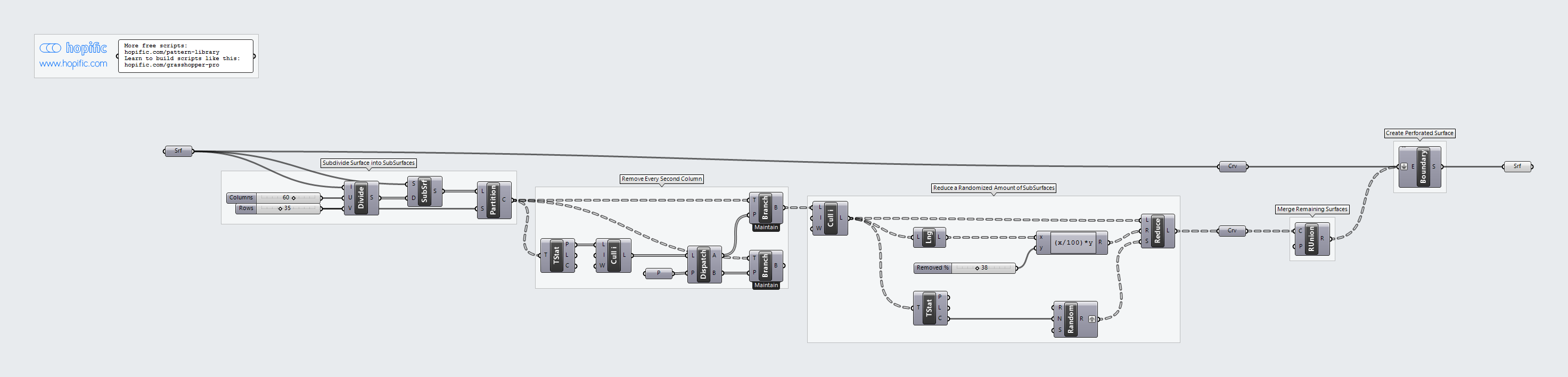
| Step | How the script does it |
|---|---|
| 1. Split the surface into cells | Divide Domain² and Isotrim cut the surface into a grid of small rectangles, Columns across and Rows along. Partition List groups them into columns. |
| 2. Keep every second column | Tree Statistics lists the columns and Cull Index drops the first and last. Dispatch with a False/True pattern picks every second one, and Tree Branch pulls out those columns. |
| 3. Leave out cells at random | Cull Index drops the top and bottom cell of each column. List Length and an Expression work out how many cells make Removed %, and Random Reduce removes that many at random, with a different seed per column from Random. |
| 4. Merge the cells into slots | A Curve parameter turns the remaining cells into their outlines, and Region Union joins touching outlines in each column into one longer slot. |
| 5. Cut the slots out of the surface | A second Curve parameter turns your surface into its outline. Boundary Surfaces takes that outline and the slot outlines together and makes one flat surface with the slots as holes. |
Want to learn how to build scripts like this on your own? Check out the Grasshopper Pro course.